
Wallcovering Estimating Software for Every Material
SiteScope estimates wallcoverings room by room from a measured floor plan: vinyl, grasscloth, fabric, murals, and specialty papers. Each material carries its own match type and seam handling, including overlap seams for commercial vinyl, and region cutouts handle partial coverage. Built for residential and commercial spec. Free includes estimating with up to 10 materials. Unlimited materials and quote PDFs are on Pro.
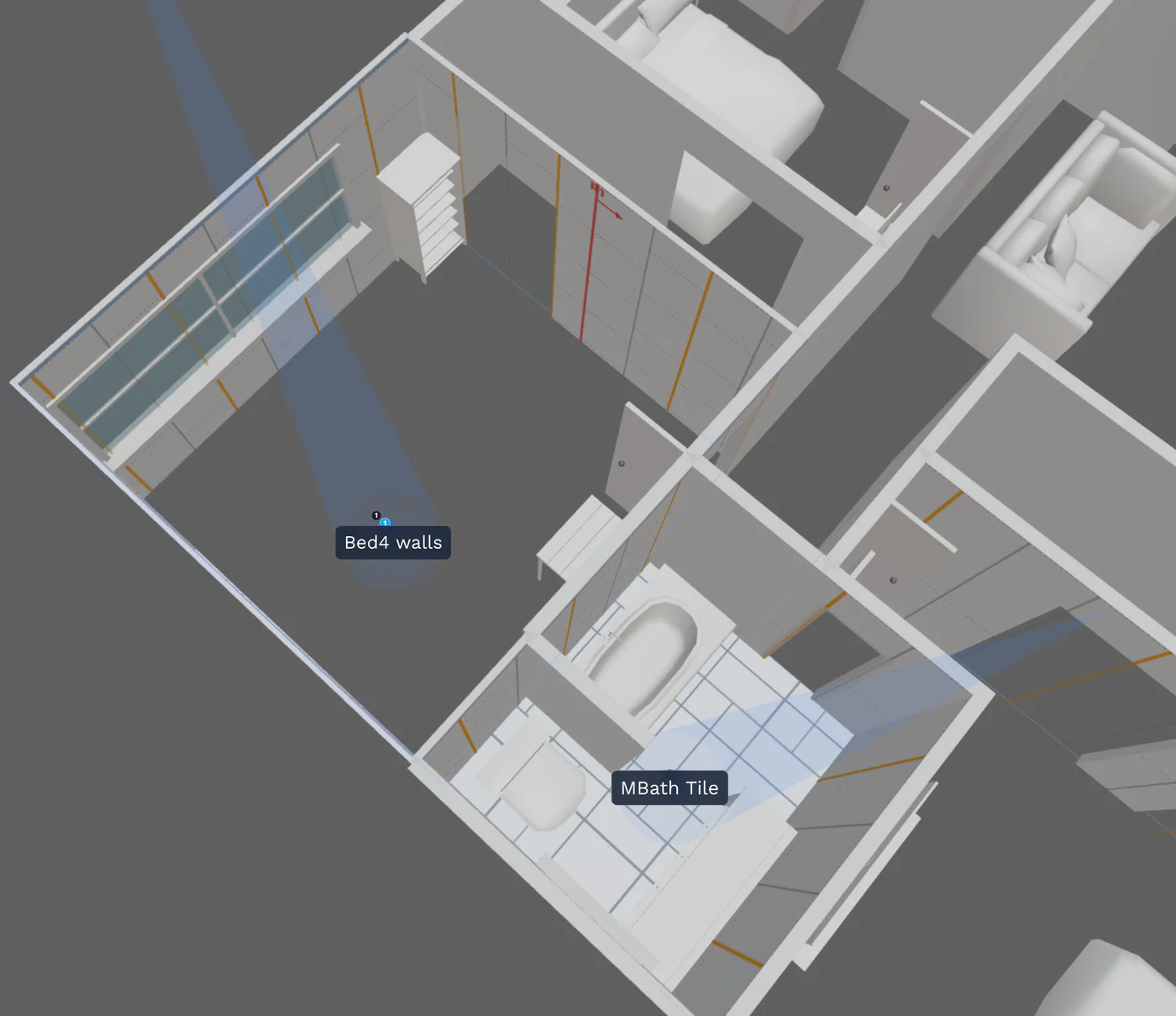
One Engine. Every Wall Covering.
The takeoff math, region cutouts, and cut-sheet pipeline are the same across materials. The pattern match type and seam handling change to fit the material's reality.
Vinyl
Seam-overlap supported. Match types tuned for vinyl behavior.
Grasscloth
Random match support. No pattern repeat penalty.
Fabric
Straight or random match. Roll width handled per spec.
Murals
Single-image wall coverings for a feature wall.
Specialty Papers
Straight, half-drop, quarter-drop, random. All match types covered.
What Spec-to-Install Actually Looks Like
Spec Sheets Don't Carry to the Wall
A commercial spec lists the wall covering, but the installer still has to figure out roll counts, kill point, and waste for the specific room. A measured takeoff closes that gap.
Match Type Varies by Material
Vinyl seams differently than paper. Grasscloth needs random match. A spec writer who calls half-drop on a vinyl job costs the installer rolls. SiteScope tracks match type per material.
Dye-Lot Consistency Across a Project
A multi-room hospitality job needs dye lots tracked across rooms, not just within a room. SiteScope's roll inventory keeps every dye lot accounted for in the cut sheet.
Features Built for Wall Coverings Work
Match Type Per Material
Straight, half-drop, quarter-drop, random, seam-overlap. Set the right match type on the catalog item once, and every room you use it in gets the right roll count.
Region Cutouts for Partial Coverage
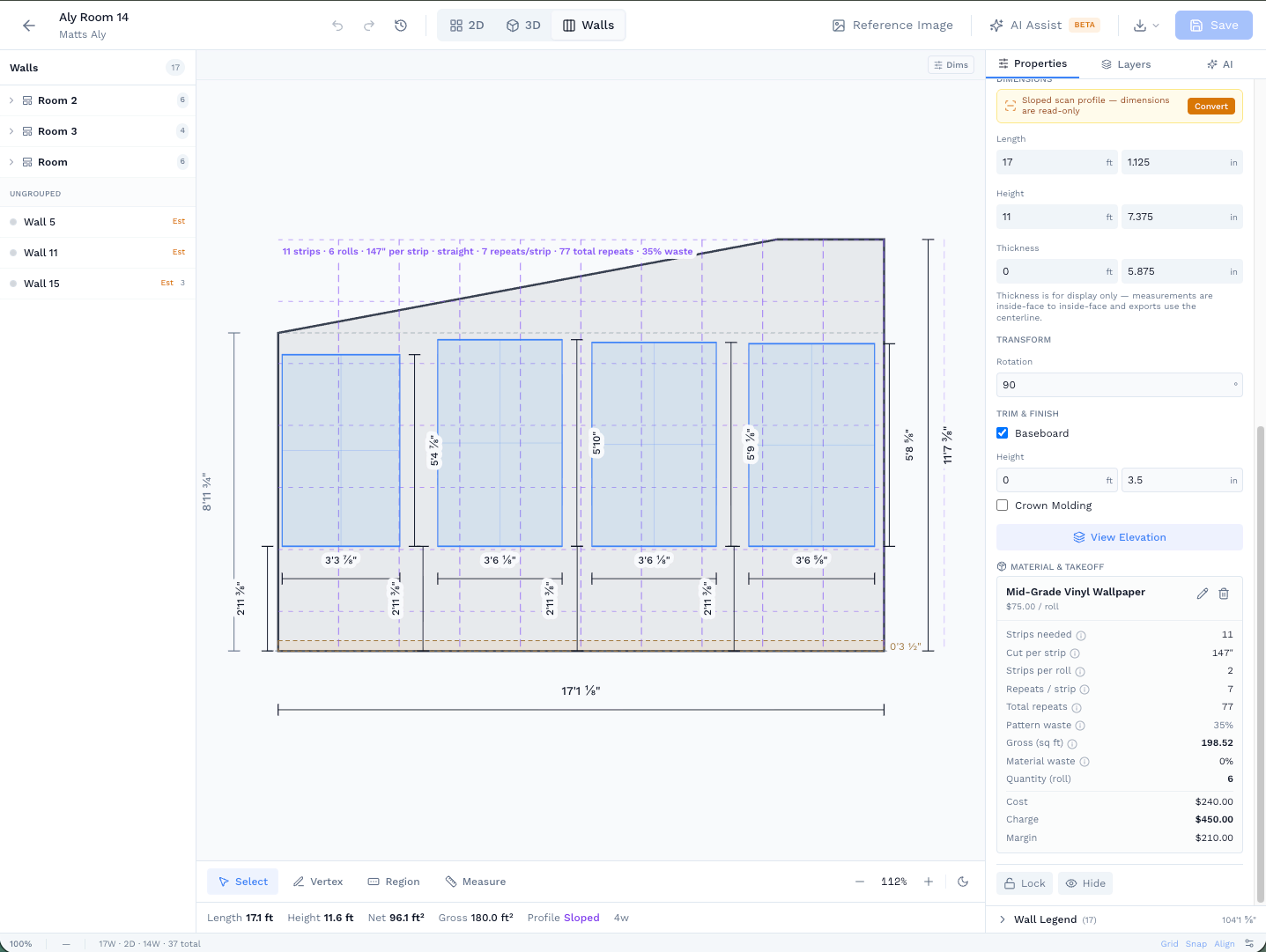
Wainscoting, feature walls, half-walls, custom-shape areas. Mark a region on the wall elevation and assign a different material. Each region gets its own takeoff line.
Vinyl Seam-Overlap Support
Commercial vinyl seams differently than paper. SiteScope handles the overlap math so vinyl roll counts come out right, not paper-pattern wrong.
Installer Cut Sheets
One PDF per room with kill point, strip table, per-wall elevations, roll inventory, and dye-lot warning. The installer carries the document, not a verbal spec.
LiDAR Room Scan*
Scan a room and every wall's exact length, height, and net area is captured automatically. Learn more →
CSV Takeoff Export
Room by room, with square feet, roll count, cost, charge, and margin. Drop into your proposal or supplier order form.
* 3D room scanning requires iPhone 12 Pro or later, or iPad Pro (2020 or later) with LiDAR sensor
Wall Elevation View, Material Applied
Stand any wall up flat and see the strips and pattern laid out before you order a single roll.
Capture, Model, Estimate
From the site walk to a roll count the installer can hang from.
- 01 · CAPTURE
Scan or trace the rooms
Scan each room with an iPhone or iPad Pro, or trace the architect's plan in the web editor. Every wall gets length, height, and openings.
- 02 · MODEL
Apply the spec
Add each wallcovering to a room and switch off the walls it skips. Match type, repeat, roll size, and seam overlap come from the catalog item.
- 03 · ESTIMATE
Rolls, cost, cut sheet
Read the roll count for each room, price it from your catalog, export CSV, and print an installer cut sheet per room.
Every Wall Covering, One Takeoff.
Room-by-room roll counts with the right match type and the right waste, no matter the material. Free includes estimating with up to 10 materials. Unlimited materials and quote PDFs are on Pro.
- Match types per material: straight, half-drop, quarter-drop, random, and seam-overlap for vinyl. Set on the catalog once, applied everywhere you use it.
- Region support: wainscoting, feature walls, partial coverage, each gets its own line item with openings already deducted.
- Cut sheets per room: kill point, strip table, per-wall elevations, roll inventory with dye-lot warning. The installer carries the document.
- Export the estimate to CSV, room by room, with cost, charge, and margin ready for your proposal.
Calculators, Guides, and Next Steps
Wallpaper Calculator
Strips and rolls with pattern repeat and seam overlap.
Butt seam vs overlap seam
Why commercial vinyl changes your strip count.
Per-roll vs per-square-foot pricing
Quote material sold either way.
Multi-floor building takeoffs
Takeoffs across floors for commercial jobs.
Installer cut sheets
Kill point, strip table, and dye-lot warnings per room.
Material takeoffs
How takeoffs work in the editor. Start free from the pricing page.
Related Use Cases
See how wall coverings fit alongside other interior trades
Frequently Asked Questions
What wall covering materials does SiteScope estimate?
How is estimating vinyl different from paper?
Does SiteScope work for commercial and hospitality jobs?
What pattern match types are supported?
Does it produce installer cut sheets for wall coverings?
Ready to Get Started?
Scan your first room free, no credit card. Capture runs on an iPhone or iPad Pro, and everything else works in your browser.

On your computer?
Point your iPhone camera here to get the free app from the App Store. Scanning needs an iPhone or iPad Pro.