
Measure Outdoor Areas from Satellite and On Site
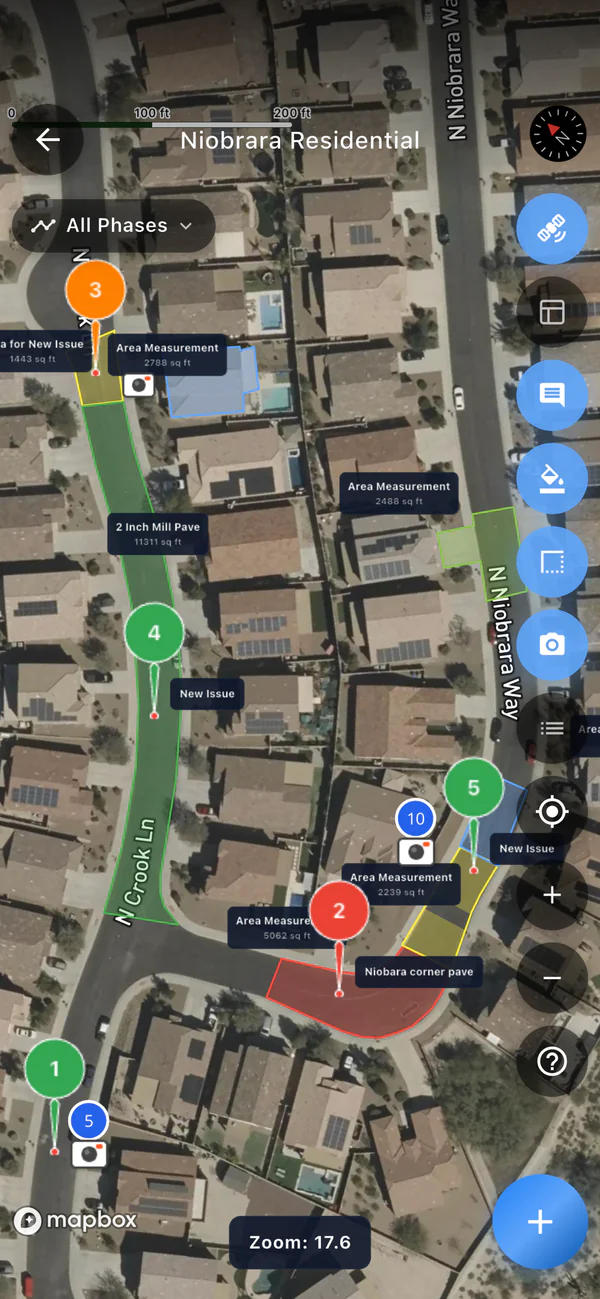
SiteScope lets you trace any outdoor area on a satellite map to get square feet and perimeter, draw lines for lengths, and carve out anything that should not count. Then walk the site and add GPS-tagged photos to the same map.
That is the exterior side of SiteScope: measuring and photos. The numbers go into your own estimate.
Free plan, no credit card. iPhone, Android, and web.
What You Can Measure
Everything is measured in square feet and feet, saved to the project, and visible on your phone and in the web app.
Areas
Tap points around a roof, lawn, driveway, or lot and close the shape. You get square feet and perimeter in linear feet.
Cutouts
Carve out anything inside an area that should not count, like a pool, a planter island, or a building. The cutout is subtracted from the total.
Lengths
Draw a line with as many points as you need for a fence, curb, gutter, or edging run. The running total shows in feet as you go.
Labels, colors, and notes
Name each measurement ("Front lawn", "Main lot"), pick a color, and add notes. If you measured on site with a tape, you can type length x width instead.
Photos on the map
GPS-tagged photos from the job appear on the project map where you took them. Mark them up with arrows, circles, boxes, and text.
One list per project
Every measurement for the job in one list you can sort by size and group by phase. Tap one to jump to it on the map.
How It Works
- STEP 01
Open the project map
Create a project at the address. The map opens on satellite imagery of the site, on your phone or in the web app.
- STEP 02
Trace what you need
Areas, cutouts, and lengths, each labeled. Do it from the office before you drive out.
- STEP 03
Check it on site
Walk the property, confirm edges the imagery hides, and take photos. They land on the same map.
What It Does and Does Not Do
Does
- Area and perimeter of any shape you trace
- Cutouts subtracted from an area
- Lengths of straight or multi-point lines
- GPS-tagged, marked-up photos on the same map
- A share link that shows the map and measurements
Does not
- Measure roof pitch or slope
- Calculate volume, tonnage, or material quantities
- Price, quote, or estimate exterior work
- Produce exterior PDF reports or ordered aerial roof reports
- Replace a site check where imagery is old or hidden
Measuring by Trade
The same map tools, with the math each trade uses to turn a measurement into an estimate.
Frequently Asked Questions
Can I measure an area on a satellite map with SiteScope?
Does SiteScope estimate or quote exterior jobs?
How accurate are satellite measurements?
Can I share the measurements with a client?
Do I need a LiDAR iPhone to measure outdoors?
Is map measuring free?
Measure Your Next Site Free
Get the app for measuring and photos in the field, or sign up and measure from your browser.
Start for Free