
To measure a room with an iPhone, use an iPhone Pro (12 Pro or newer) or an iPad Pro (2020 or newer) with a LiDAR scanning app. Turn the lights on, open the doors you want to walk through, then walk the room slowly with the phone upright so the camera sees every wall, door, and window. When you finish, the app builds a measured floor plan with room areas, wall lengths, and openings. Check the few dimensions that are critical to the job with a tape before you order or cut.
This guide covers what the sensor does, how to get a clean scan, what you get back, and how far to trust the numbers.
What You Need
- An iPhone or iPad with LiDAR. That is iPhone 12 Pro and newer Pro models, and iPad Pro from 2020 on. The standard (non-Pro) iPhones do not have the sensor, so they cannot do a LiDAR room scan.
- iOS 17 or later. SiteScope’s 3D Scan needs it.
- A scanning app that makes a floor plan, not just a 3D picture. In SiteScope, the 3D Scan mode produces the measured plan. Point Cloud is a second mode for dense as-built detail.
- Battery and a few minutes per room. Start with a charged phone.
No Pro device? You can still trace a blueprint or photo in the SiteScope web editor, or send a client with an iPhone Pro a guest scan link. For a quick hand-measured number, the square footage calculator does the math.
What the LiDAR Sensor Does
The LiDAR scanner on a Pro iPhone fires infrared light and times how long it takes to bounce back, which gives it the distance to every surface in view. The phone combines those depth readings with the camera and motion sensors to keep track of where it is as you walk. That is how it knows where each wall starts and stops, and how far apart they are.
Two things follow from that. The sensor works best within a few meters of the surfaces it is measuring. And most bad scans are tracking problems (the phone lost track of where it was), not sensor problems. Good technique is mostly about keeping tracking happy.
Before You Start
- Turn on the lights and open the blinds. The camera helps the phone track, and it needs to see. Dark rooms scan poorly.
- Open the interior doors you plan to walk through, so you can move from room to room without stopping, and so the doorways read as openings.
- Move small clutter off the floor along the walls if you can. The sensor needs to see where the wall meets the floor.
- Note glass and mirrors. Large mirrors, glass shower walls, and storefront glazing confuse any depth sensor. You will check those spots afterward.
How to Scan a Room
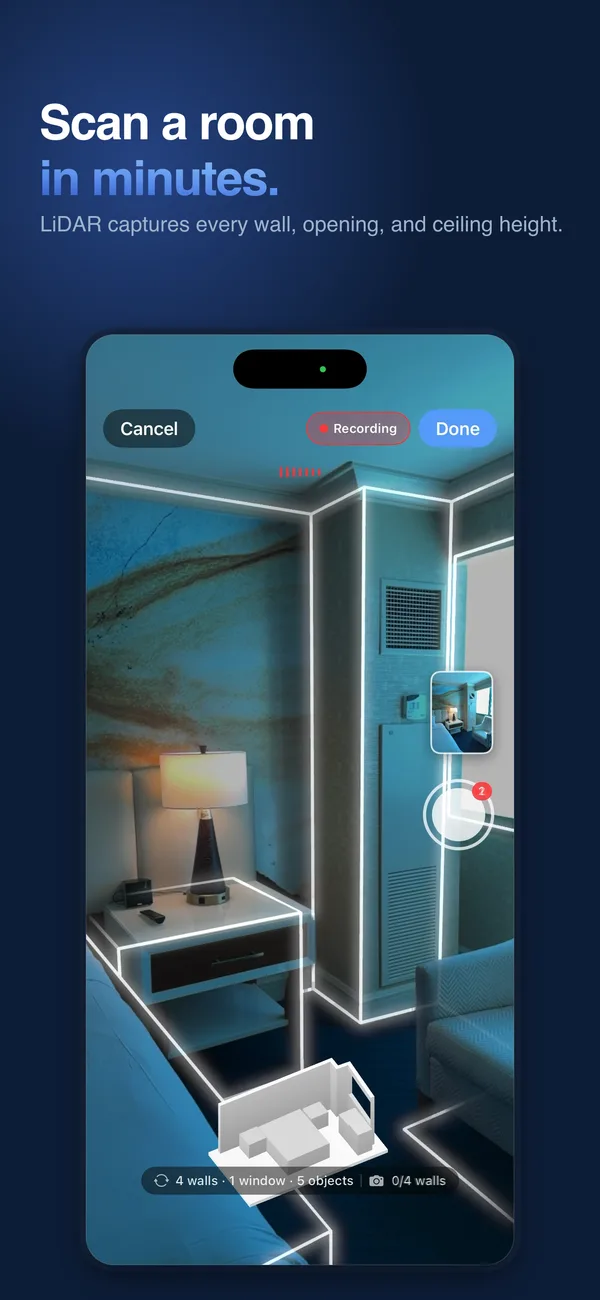
- Start near a corner with the phone upright at about chest height, camera facing the wall.
- Walk slowly along the walls. A steady, slow walk beats a fast one every time. Do not spin in place.
- Tilt to catch the edges. Sweep the phone up toward the ceiling line and down toward the floor line as you go, so each wall is seen top to bottom.
- Pause at doors and windows long enough for the app to pick them up.
- Get every wall. Short returns, closets, and the wall behind the door are the ones people miss.
- Walk the whole floor if you need it. In SiteScope, one 3D Scan can cover a single room or walk room to room through a whole floor.
- One floor per scan. Stairs are where tracking struggles. For a two-story house, finish the first floor, then start a new scan upstairs.
If the app shows a coaching message, slow down and do what it asks. If a scan goes badly wrong, it is usually faster to start that room over than to fix it later.
What You Get Back
In SiteScope, a finished scan gives you:
- A measured floor plan with each room, its floor area, wall lengths, doors, windows, and ceiling heights.
- Measurements you can use: gross and net wall area (with doors and windows taken out), room perimeters, and room areas.
- A photoreal 3D walkthrough you can share by link on every plan. Your client opens it in a browser, no app needed.
- PDF reports on every plan, plus IFC, DXF, E57, LAZ, and PLY exports on Pro for CAD and BIM work.
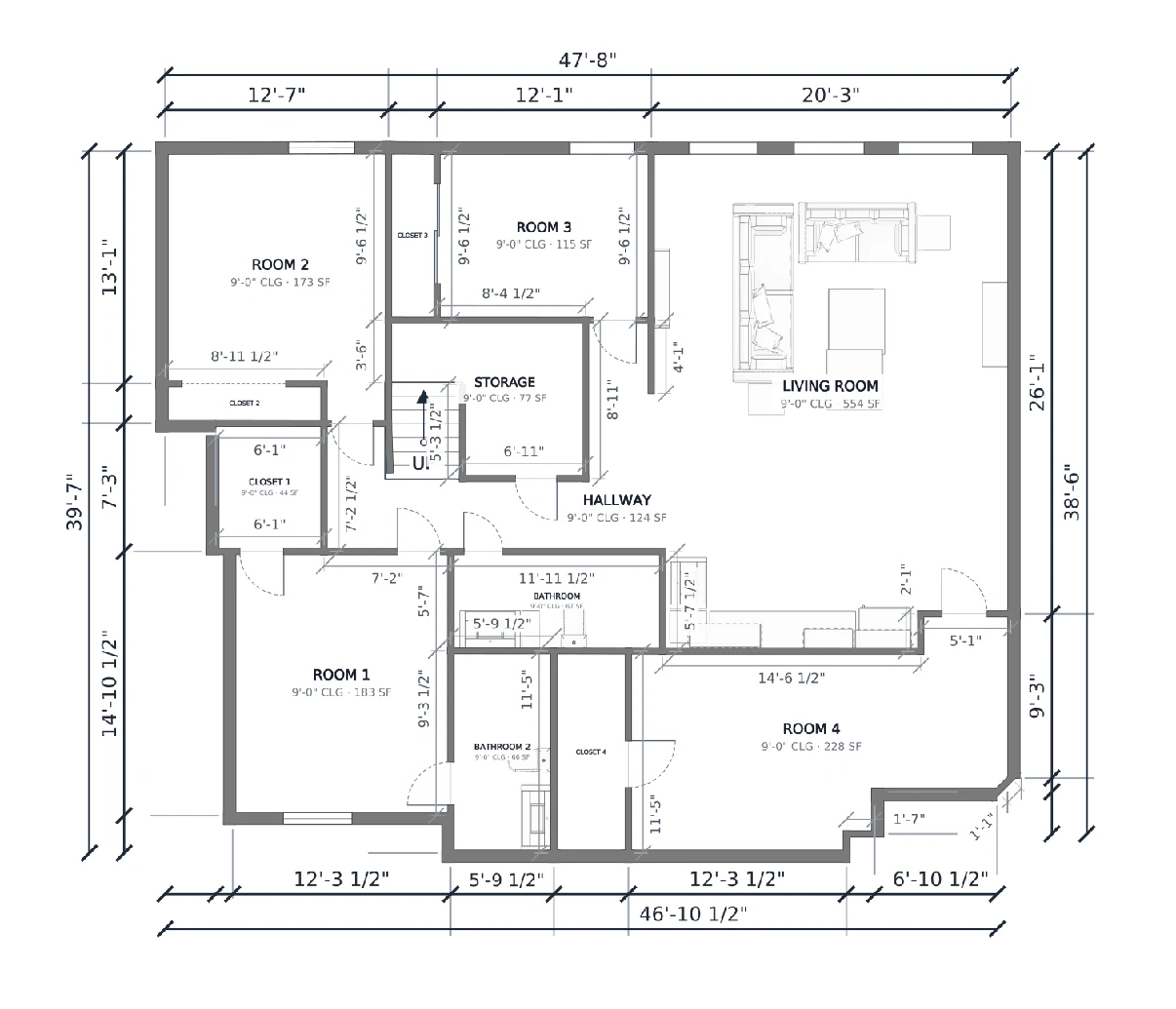
If something on the plan looks off, such as a wall hidden behind a wardrobe, fix it in the plan editor. The plan is yours to adjust.
How Accurate Is It?
For room-scale work, phone LiDAR is close enough to estimate finishes and plan a remodel, and it saves the measuring and re-drawing that eat a bid visit. It is not a survey-grade instrument. Our iPhone LiDAR accuracy guide goes deeper.
The places to double check:
- Long runs. Small tracking errors add up over distance. Tape the overall length of a long hallway or open floor.
- Glass, mirrors, and glossy surfaces. These can throw off the depth reading.
- Anything you cut or fabricate to. Cabinet runs, countertops, rough openings, and code-driven clearances. Measure them by hand.
The practical way to think about it: the scan replaces most of the measuring, and the tape confirms the handful of numbers that cannot be wrong. You re-measure less and make fewer return trips, but you still verify what is critical.
From Measurements to an Estimate
Once you have the plan, the measurements can drive the estimate directly. In SiteScope you pick a room and add materials to its walls, floor, ceiling, and baseboards, and each one turns into gallons, rolls, boxes, square yards, or linear feet. See how it works for flooring, painting, tile, and wallpaper and wallcoverings, or for whole remodeling bids. The floor plan app for contractors page covers everything on the plan.
Free covers 3 projects with 1 3D scan and 1 floor plan per project, plus estimating with up to 10 materials. See pricing for Pro and Business.
FAQ
Can any iPhone measure a room?
Any iPhone can run Apple’s Measure app for single distances, but a full LiDAR room scan needs an iPhone 12 Pro or newer Pro model, or an iPad Pro from 2020 on. SiteScope’s 3D Scan also needs iOS 17 or later.
How long does it take to scan a room?
A typical room takes a few minutes of walking. A whole floor takes longer, depending on how many rooms and how much furniture is in the way.
Do I still need a tape measure?
Yes, for the dimensions that are critical to the job, such as cabinet runs and rough openings. The scan measures the room so you re-measure less, and the tape confirms the numbers that cannot be wrong.
Can I scan a two-story house in one go?
Scan one floor at a time. A single scan can walk a whole floor, and you start a new scan for each additional floor.
Does the scan work on Android?
LiDAR room scanning needs an iPhone Pro or iPad Pro. The SiteScope Android app is for photos and viewing projects, and anyone can review the plan in a web browser.